
C-Memory Management and Usage
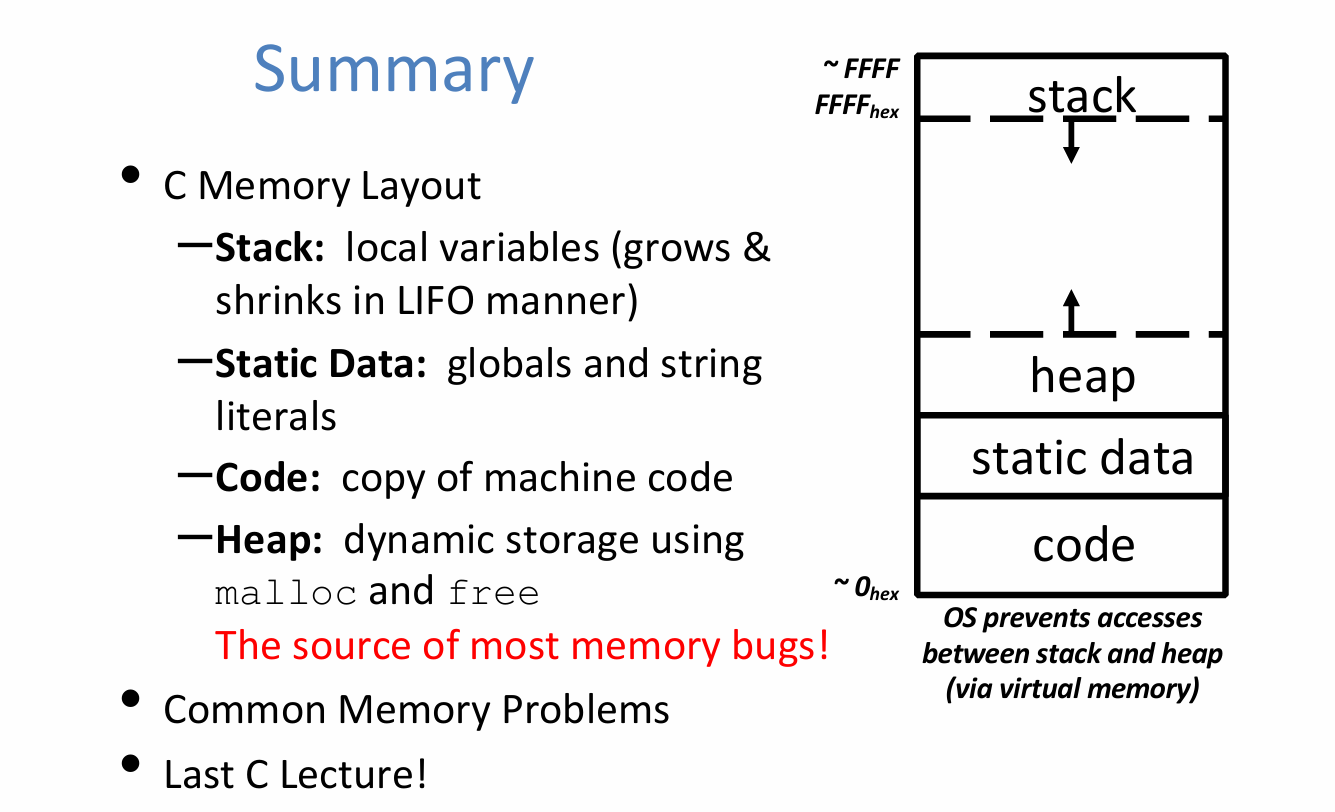
C Memory Layout
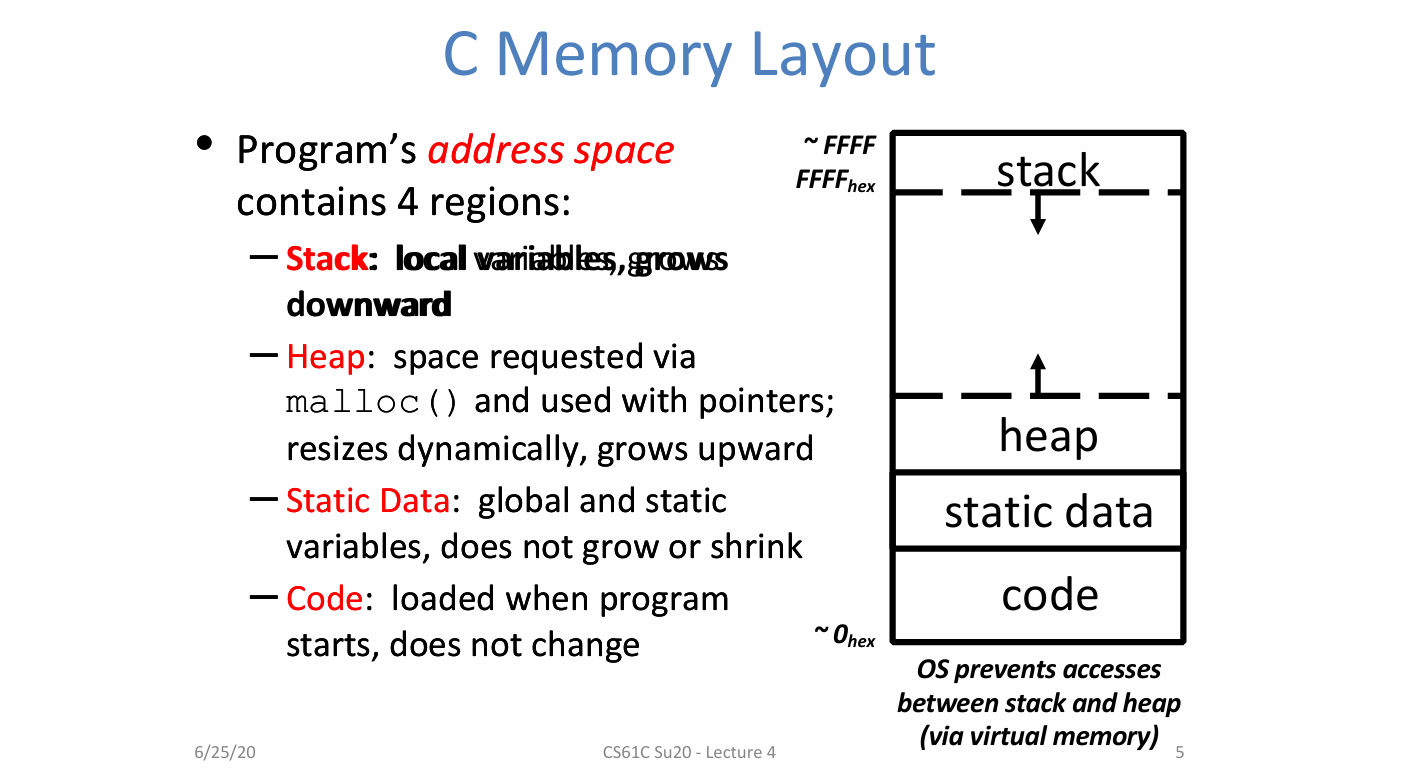
Stack:
- grow downward
- contains local variables and function frame information
Heap:
- grow upward
- you can request space via
malloc(),reallocorcallocand use the space with pointers typically - it can be dynamically resized
Static Data:
- does not grow or shrink, as this should be the same throughout the life tim of the program
- holds global and static variables
Code:
- does not change (though it technologically can)
- this is where the program is loaded to and where the program starts
OS prevents accesses between stack and heap via virtual memory
Where Do the Variables Go?
- Declared outside a function:
- Static Data
- Declared inside a function:
- Stack
main()is a function- functions have some information that it needs so it knows how to return and the parameters that are passed into it.
- Freed when function returns
- when function returns, it frees all that data off the stack, so the stack will go back to where it was before function was called
- Dynamically allocated:
- Heap
- i.e.
malloc()
1 |
|
The Stack
Each stack frame is a contiguous block of memory holding the local variables of a single procedure
A stack frame includes:
- Location of caller function
- Function arguments
- Space for local variables
Stack pointer (SP) tells where lowest (current) stack frame is
When procedure ends, stack pointer is moved back (but data remains (garbage!)); frees memory for future stack frames;
Last In, First Out(LIFO) data structure
- e.g. stack frames change when functions are called……
Stack Misuse Example
1 | int *getPtr() { |
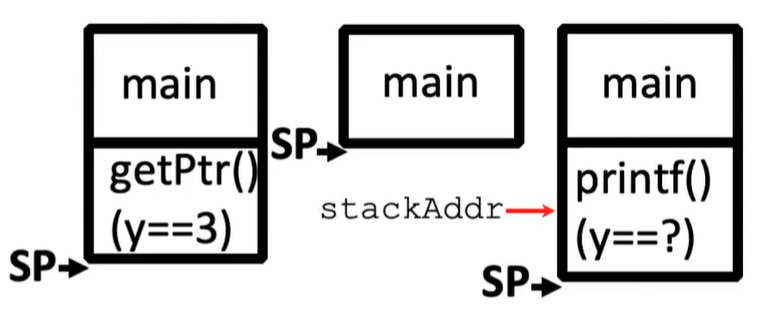
- printf overwrites stack frame
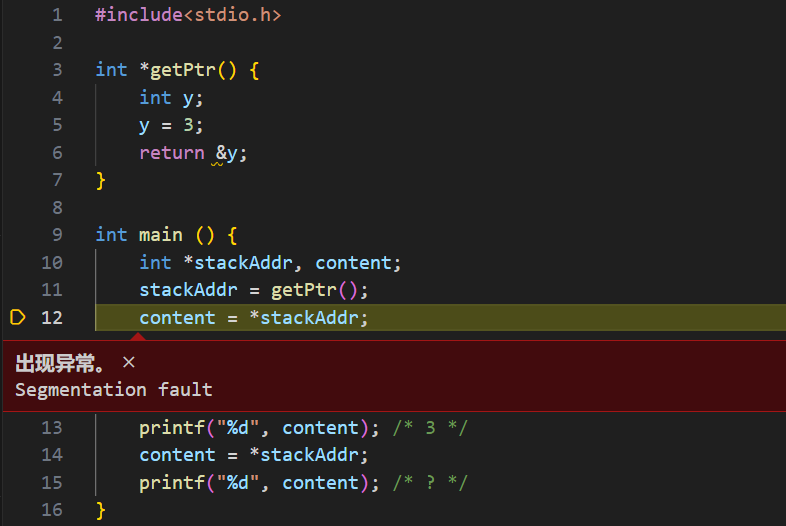
- Never return pointers to local variable from functions
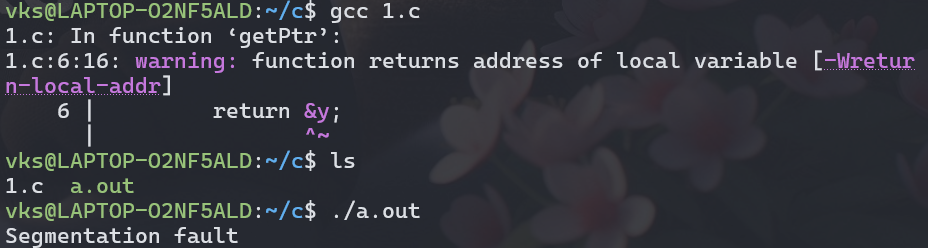
- Your compiler will warn you about this
- don’t ignore such warnings !
- 实际运行的效果如下:
Static Data
Place for variables that persist
- Data not subject to comings and goings like function calls
- Examples: String literals, global variables
- String literal example: char * str = “hi”;
- Do not be mistaken with: char str[] = “hi”;
- This will put str on the stack!
Size does not change, but sometimes data can
- Notably string literals cannot
Technically the static data is split into two different sections
- read-only section
- read-write section
Code
- Copy of your code goes here
- C code becomes data too!
- Does (should) not change
- Typically read only
Addressing and Endianness
- The size of an address (and thus, the size of a pointer) in bytes depends on architecture (eg: 32-bit Windows, 64-bit Mac OS)
- eg: for 32-bit, have $2^{32}$ possible addresses
- In this class, we will assume a machine is a 32-bit machine unless told otherwise
- If a machine is byte-addressed, then each of its addresses points to a unique byte
- word-addresses = address points to a word
- In this class, we will assume a machine is byte-addressed unless told otherwise.
- Question: on a byte-addressed machine, how can we order the bytes of an integer in mem?
- Answer: it depends
- this concept is actually called endianness
Endianness
- Big Endian:
- Descending numerical significance with ascending memory addresses
- Little Endian
- Ascending numerical significance with ascending mem
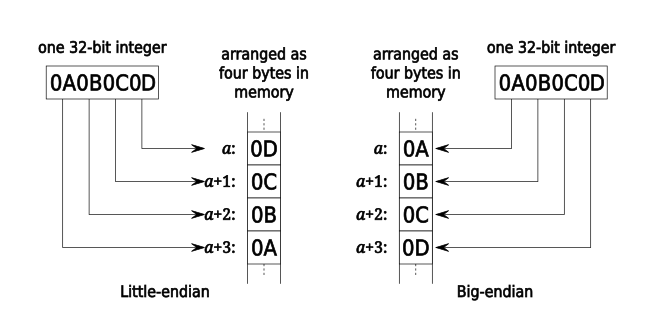
(In this class, we will assume a machine is little endian unless otherwise stated.)
- Ascending numerical significance with ascending mem
Common Mistakes
- Endianness ONLY APPLIES to values that occupy multiple bytes
- Endianness refers to STORAGE IN MEMORY NOT number representation
- Ex: char c = 97
c == 0b01100001in both big and little endian
- Arrays and pointers still have the same order
int a[5] = {1, 2, 3, 4, 5}(assume address 0x40)&(a[0]) == 0x40 && a[0] == 1- in both big and little endian
Dynamic Memory Allocation
- Want persisting memory (like static) even when we don’t know size at compile time?
- e.g. input files, user interaction
- Stack won’t work because stack frames aren’t persistent
- Dynamically allocated memory goes on the Heap
- more permanent than Stack
- Need as much space as possible without interfering with Stack
- Start at opposite end and grow towards Stack
sizeof()
- If integer sizes are machine dependent, how do we tell?
- Use
sizeof()operator- Returns size in number of char-sized units of a variable or data type name
- Examples:
int x; sizeof(x); sizeof(int);
- Examples:
sizeof(char)is ALWAYS 1!- Note the number of bits contained in a char is also not always 1 Byte though it generally is. This means sizeof is normally returning the number of Bytes which a variable or data type is.
- In this class, we will assume a character is always 1 Byte unless otherwise stated.
- Returns size in number of char-sized units of a variable or data type name
sizeof() and Arrays
- Can we use sizeof to determine a length of an array?
- Generally no but there is an exception!
int a[61];- If I was to perform sizeof(a), I would get back the number of characters it would take to fill the array a.
- To get the number of elements, I could do:
- sizeof(a) / sizeof(int)
- This ONLY works for arrays defined on the stack IN THE SAME FUNCTION.
- This is just something fun you should know, but please do not do this! You should be keeping track of an array size elsewhere!
- Generally no but there is an exception!
Allocating Memory
- 3 functions for requesting memory:
malloc(),calloc(),andrealloc malloc(n)- Allocates a continuous block of n bytes of uninitialized memory (contains garbage!)
- Returns a pointer to the beginning of the allocated block; NULL indicates failed request (check for this!)
- Different blocks not necessarily adjacent and they might not be in order
Using malloc()
- Almost always used for arrays or structs
- Good practice to use
sizeof()and typecastingint *p = (int *) malloc(n*sizeof(int));sizeof()makes code more portablemalloc()returnsvoid *; typecast will help you catch coding errors when pointer types don’t match
- Can use array or pointer syntax to access
Releasing Memory
- Release memory on the Heap using
free()- Memory is limited, release when done
free(p)- Pass it pointer
pto beginning of allocated block; releases the whole block pmust be the address originally returned bym/c/realloc(), otherwise throws system exception- Don’t call
free()on a block that has already been released or on NULL - Make sure you don’t lose the original address
- eg:
p++is a BAD IDEA; use a separate pointer
- eg:
- Pass it pointer
Calloc
void *calloc(size_t nmemb, size_t size)- Like malloc, except it initializes the memory to 0
nmembis the number of memberssizeis the size of each member- Ex for allocating space for 5 integers
int *p = (int *) calloc (5, sizeof (int));
Realloc
- What happens when I need more or less memory in an array
void *realloc(void *ptr, size_t size)- Takes in a ptr that has been the return of malloc/calloc/realloc and a new size
- Returns a pointer with now size space (or NULL) and copies any contents from ptr
- Realloc can move or keep the address the same
- DO NOT rely on old ptr values
Dynamic Memory Example
1 |
|
Common Memory Problems
Know Your Memory Errors
- Segmentation Fault
- “An error in which a running Unix program attempts to access memory not allocated to it and terminates with a segmentation violation error and usually a core with a segmentation violation error and usually a core dump.”
- Bus Error
- “A fatal failure in the execution of a machine language instruction resulting from the processor detecting an anomalous condition on its bus. Such conditions anomalous condition on its bus. Such conditions include invalid address alignment (accessing a multi-byte number at an odd address), accessing a physical address that does not correspond to any device,or some other device-specific hardware error.”
Common Memory Problem
- Using uninitialized values
- Using memory that you don’t own
- Using NULL or garbage data as a pointer
- De-allocated stack or heap variable
- Out of bounds reference to stack or heap array
- Freeing invalid memory
- Memory leaks
Using uninitialized values
- What is wrong with this code?
1
2
3
4
5
6
7
8
9
10void foo(int *p) {
int j;
*p = j;
}
void bar() {
int i = 10;
foo(&i);
printf("i = %d\n", i);
} jis uninitialized (garbage), copied int*p- Using
iwhich now contains garbage
Using memory that you don’t own
1:
- What is wrong with this code?
1
2
3
4
5
6
7
8
9
10
11typedef struct node {
struct node* next;
int val;
} Node;
int findLastNodeValue(Node* head) {
while (head->next != NULL) {
head = head->next;
return head->val;
}
} - What if
headis NULL - No warnings! Just Seg Fault that needs finding!
2:
- What is wrong with this code?
1
2
3
4
5
6
7
8
9
10char *append(const char* s1, const char *s2) {
const int MAXSIZE = 128;
char result[MAXSIZE];
int i=0, j=0;
for (; i < MAXSIZE-1 && j < strlen(s1); i++; j++)
result[i] = s1[j];
for (; i < MAXSIZE-1 && j < strlen(s2); i++; j++)
result[i] = s2[j];
result[++i] = '\0';
return result; resultis defined on the stack(local array)- Pointer to Stack(array) no longer valid once function returns
3:
- What is wrong with this code?
1
2
3
4
5
6
7
8
9
10
11
12typedef struct {
char *name;
int age;
} Profile;
Profile *person =(Profile *)malloc(sizeof(Profile));
char *name = getName();
person->name = malloc(sizeof(char)*strlen(name));
strcpy(person->name,name);
... // Do stuff (that isn’t buggy)
free(person);
free(person->name) - Did not allocate space for the null terminator!
person->name = malloc(sizeof(char)*strlen(name));Want(strlen(name)+1)here. - Accessing memory after you’ve freed it. These statements should be switched.
Using Memory You Haven’t Allocated
What is wrong with this code?
1
2
3
4
5
6
7void StringManipulate() {
const char *name = “Safety Critical";
char *str = malloc(sizeof (char) * 10);
strncpy(str, name, 10);
str[10] = '\0';
printf("%s\n", str); //read until '\0'
}Write beyond array bounds
Read beyond array bounds
What is wrong with this code?
1
2
3
4
5
6char buffer[1024]; /* global */
int foo (char *str) {
strcpy(buffer, str);
...
}What if more than a kibi characters?
This is called BUFFER OVERRUN or BUFFER OVERFLOW and is a security flaw!!!
C String Standard Functions Revised
- Accessible with #include<string.h>
int strnlen(char *string,size_t n);- Returns the length of string (not including null term), searching up to n
int strncmp(char *str1, char *str2, size_t n);- Return 0 if
str1andstr2are identical (how is this different fromstr1 == str2?), comparing up to n bytes
- Return 0 if
char *strncpy(char *dst, char *src, size_t n);- Copy up to the first n bytes of string src to the memory at dst. Caller must ensure that dst has enough memory to hold the data to be copied
- Note:
dst = srconly copies pointer (the address)
A Safer Version
1 |
|
Freeing invalid memory
- What is wrong with these code?
1
2
3
4void FreeMemX() {
int fnh = 0;
free(&fnh);
}
- Free of a Stack variable
1 | void FreeMemY() { |
- Free of middle of block
- Free of already freed block
Memory leaks
What is wrong with this code?
1
2
3
4
5
6
7
8
9
10int *pi;
viod foo() {
pi = (int*)malloc(8*sizeof(int));
...
free(pi);
}
void main() {
pi = (int*)malloc(4*sizeof(int));
foo();
}foo()leaks memorypiinfoo()override old pointer! No way to free those 4*sizeof(int) bytes nowRemember that Java has garbage collection but C doesn’t
Memory Leak: when you allocate memory but lose the pointer necessary to free it
Rule of Thumb: More mallocs than frees probably indicates a memory leak
Potential memory leak: Changing pointer – do you still have copy to use with free later
1 | plk = (int*)malloc(2*sizeof(int)); |
Debugging Tools
- Runtime analysis tools for finding memory errors
- Dynamic analysis tool: Collects information on memory management while program runs
- No tool is guaranteed to find ALL memory bugs; this is a very challenging programming language research problem
- You will be introduced to Valgrind in Lab 1
C Wrap-up: Linked List Example
Linked List Example
- We want to generate a linked list of strings
- this example uses structs, pointers, malloc(), and free()
- Create a structure for nodes of the list:
1
2
3
4struct Node {
char *value;
struct Node *next; //the link of the linked list
} node;
Adding a Node to the List
- Want to write addNode to support functionality as shown:
1 | char *s1 = "start", *s2 = "middle", *s3 = "end"; |
s1,s2,s3are stored in the static portion of memory,because they are string literalsthis function may take a NULL value, so we need to make sure that we handle that case, so we shouldn’t ever de-reference anything within that list
Let’s examine the $3^{rd}$ call (“start”);
1
2
3
4
5
6
7node *addNode(char *s, node *list) {
node *new = (node *)malloc(sizeof(NodeStruct));
new->value = (char *)malloc(strlen(s) + 1); //don't forget this for the null terminator
strcpy(new->value, s);
new->next = list;
return new;
}Delete/free the first node(“start”):
1
2
3
4
5
6node *deleteNode(node *list) {
node *temp = list->next;
free(list->value);
free(list);
return temp;
}
Additional Function
- How might you implement the following?
- Append node to end of a list
- Delete/free an entire list–Join two lists together
- Reorder a list alphabetically (sort)
Summary
Bonus Slides
Memory Management
- Many calls to malloc() and free() with many different size blocks – where are they placed?
- Want system to be fast with minimal memory overhead
- Versus automatic garbage collection of Java
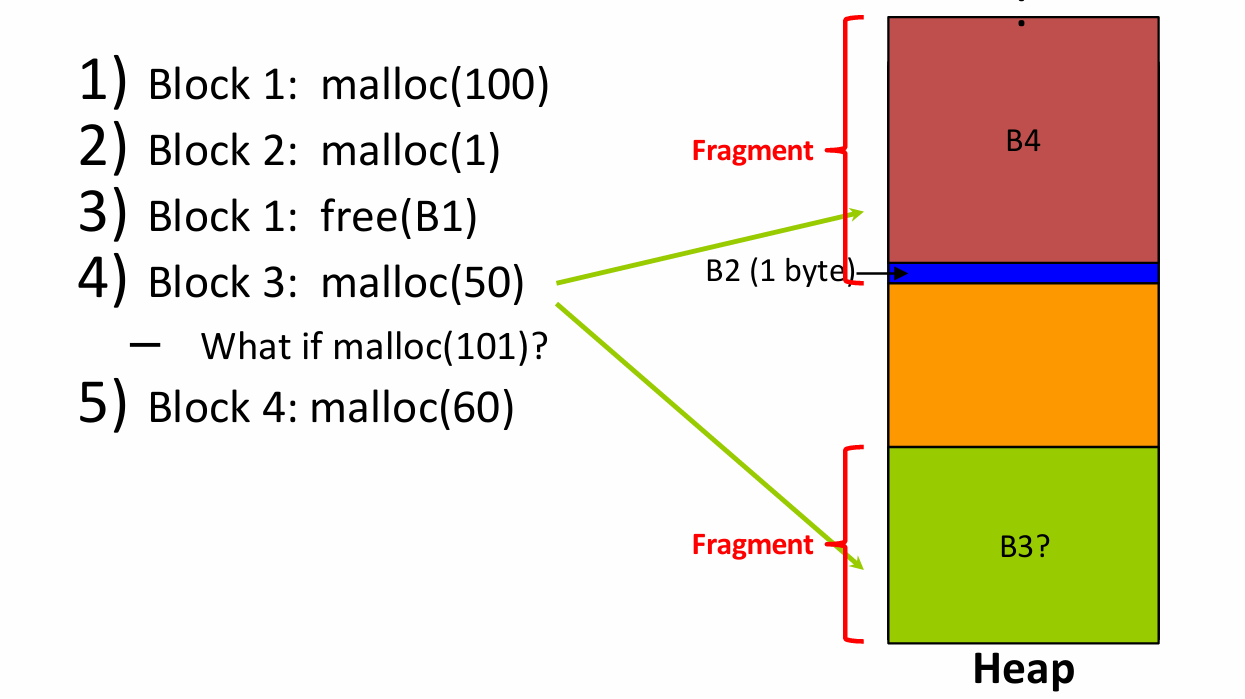
- Want to avoid fragmentation, the tendency of free space on the heap to get separated into small chunks
Fragmentation Example
Basic Allocation Strategy: K&R
- This is just one of many possible memory management algorithms
- Just to give you a taste
- No single best approach for every application
K&R Implementation
- Each block holds its own size and pointer to next block
free()adds block to the list, combines with adjacent free blocksmalloc()searches free list for block large enough to meet request- If multiple blocks fit request, which one do we use?
Choosing a Block in malloc()
- Best-fit: request Choose smallest block that fits
- Tries to limit wasted fragmentation space, but takes more time and leaves lots of small blocks
- First-fit: Choose first block that is large enough (always starts from beginning)
- Fast but tends to concentrate small blocks at beginning
- Next-fit: Like first-fit, but resume search from where we last left off
- Fast and does not concentrate small blocks at front